Home lab

Pi Photo Frame

Our old family photos are scanned. Every one of them sits in a folder on the NAS. Nobody ever opens that folder. That's not preserving memories. That's a digital attic.

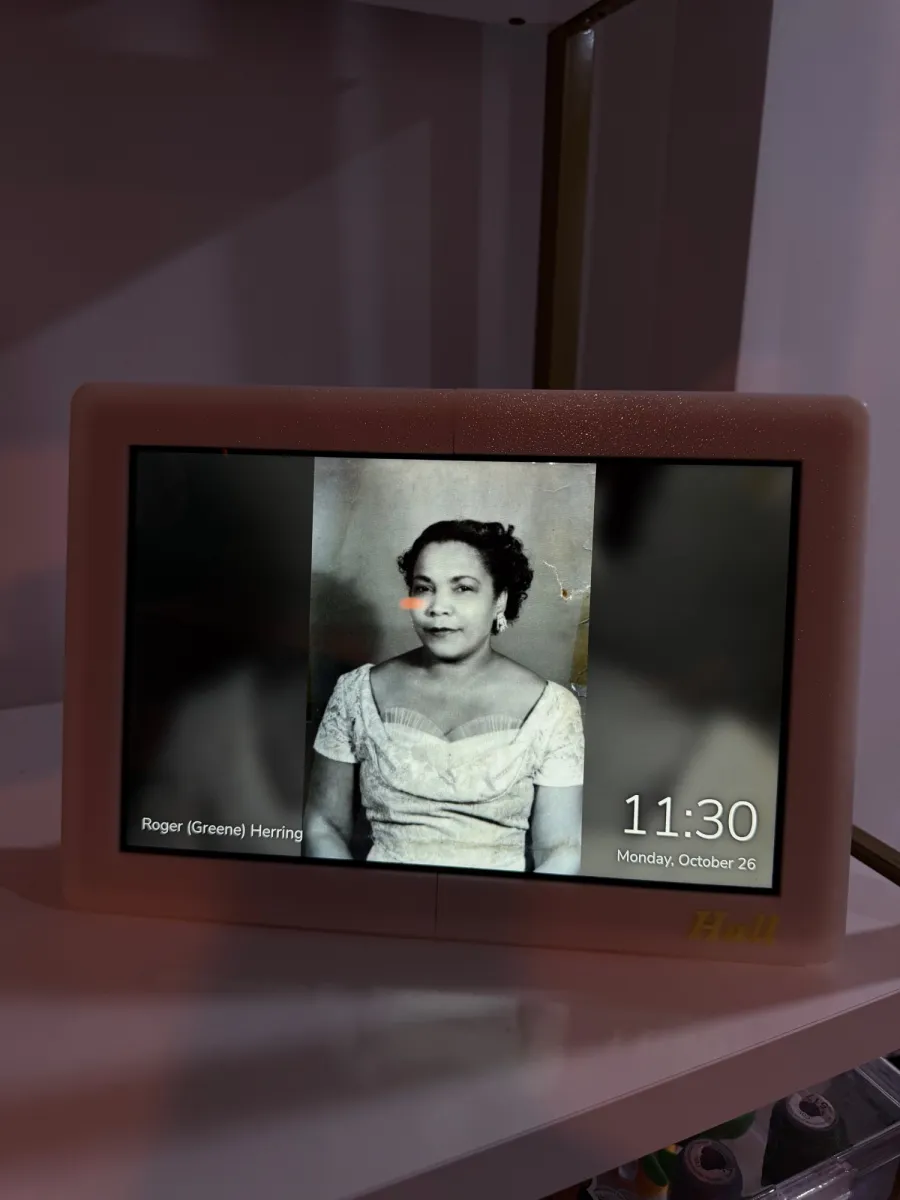
So I built a frame to haul them out. A Raspberry Pi 5 sits behind the 10.1″ Raspberry Pi Touch Display 2, turned on its side for landscape. It reads the scans straight off the NAS, shuffles them, and crossfades to a new one every 15 seconds, with the time and date in the corner and the names of the people in it along the bottom. It goes dark at 10 PM and wakes at 7 AM. The case is a frame I 3D-printed in Inland’s Glow in the Dark PLA (Luminous), with “Hall” inlaid in the lower-right corner. I started in Inland’s Wood Rainbow, a dual-color filament. The two halves of the bezel never came out the same color. So now the frame glows in the dark instead.

Host: thepyramidPhotos: NAS share, read-onlyScreen: 7 AM to 10 PMNames: Immich on heinzfield
The photo frame on a shelf, showing a black-and-white family portrait with a name caption in the lower left and the time and date in the lower right.
Layout

What's in the frame, front to back

BezelFront
3D-printed frameInland Glow in the Dark PLA (Luminous), gold “Hall” inlay
263 × 182 mmTwo halves, pinned and gluedNo supports
ScreenLayer 2
Raspberry Pi Touch Display 210.1″, 1200 × 1920, rotated 90°
Chromium kioskSlideshow + clockBacklight on a schedule
PiLayer 3
thepyramidPi 5 on the display's standoffs
Photo server (Python)NAS automountImmich name captionssystemd timersLogs in RAM
CoverBack
Enclosed back and leg4 × M3 screws, 15° recline
Hides the Pi and cables31 mm clearance
Photos live on the NAS, never on the PiOne power cable out the backRebuildable from one install script
Hostname

Named for a stadium, like the rest

The rack Pis are named for my teams' home grounds. The frame gets the one the Grizzlies left behind.

thepyramidPhoto frame

The Pyramid

Memphis Grizzlies (NBA), 2001 to 2004

A 32-story steel pyramid on the Mississippi, opened in 1991 and home to the Grizzlies for their first three seasons in Memphis before they moved to FedExForum. It sat empty for years. Today it's a Bass Pro Shops with a swamp, a hotel, and an elevator to the top. A building that now mostly holds old things on display felt right for a box full of old photos. It also sits right next to theforum in the naming scheme, the same way the real one sits a mile up the road from it.

About the Pyramid
Photo path

How a scan gets from the NAS to the screen

The originals never leave the NAS. The Pi borrows each one, shrinks it to fit the screen, and hands it to the browser.

SMB, read-only mounted on demand rescan, 10 min resized to fit, localhost:8080 full screen backlight on / off LinkStation NASshare/scans /mnt/scansCIFS automount on thepyramid Photo serverserver.py, shuffle + resize Chromium kioskslideshow + clock page Touch Display 2landscape, cursor hidden systemd timers7 AM on, 10 PM off
Resized on the fly

Some scans are hundreds of megapixels. The server shrinks each one to the screen's size before the browser sees it, so a giant TIFF loads as fast as a phone photo.

No black bars

A photo that doesn't fill the screen sits on a blurred, dimmed copy of itself. Old square prints and tall portraits both look intentional.

Right side up

The server reads each photo's rotation tag and turns it upright first. Nobody has to tilt their head at Grandma.

Name captions

Who's in the photo

Old photos are better when you know who's in them. Immich runs on heinzfield, one of the rack Pis. It reads the same NAS scans, finds the faces, and groups them by person. I name each group once, and the frame shows those names in the lower-left corner of every photo they're in.

Named once

Immich groups the faces it thinks belong to the same person. I type a name, merge the groups that turn out to be the same person at 8 and at 48, and hide anyone I don't want captioned. Immich won't call someone a person until it has three matching faces. I dropped that to one, so people who turn up in a single scan get a name too.

Look, don't touch

Immich mounts the scans read-only with the frame's own NAS login. The frame's API key can only read photos and people, and it lives on the Pi, readable only by root.

Catches up on its own

The server asks Immich for names every 10 minutes, and the page reloads them on the same schedule. A new name shows up on the frame within about 20 minutes, with no restart.

Connecting to the NAS

A read-only mount that never blocks boot

The share is mounted with one line in /etc/fstab. Each option is there for a reason.

SettingWhat it doesWhy it matters
roMounts the share read-onlyThe frame can look at the family archive. It can't delete it.
x-systemd.automountConnects the first time a photo is asked forThe Pi doesn't wait on the network at boot.
nofail, _netdevMarks the share as optional and network-basedIf the NAS is off, the Pi still boots and the page still loads.
mount-timeout=30Gives up after 30 secondsA sleepy NAS can't hang the frame.
credentials=Reads the login from /etc/frame-smb-credentialsThe password is stored only on the Pi, readable only by root. It's never in the code.
vers=2.0Speaks SMB 2The version the LinkStation supports.
Its own NAS account

The frame logs in as photoframe, a user with Read Only access to the share and nothing else.

The group gotcha

On the LinkStation, a group set to “no access” overrides the user's own permission. The hdusers group also needs Read Only on the share, or the mount fails with a confusing “permission denied.” Ask me how I know.

Ignores the junk

The scan skips hidden folders, the NAS's @ and # system folders, and the ._ files macOS sprinkles on every network drive it touches.

Schedule

What runs, and when

The Pi never shuts down. Only the backlight sleeps, so a power cut at the wrong moment can't corrupt the SD card mid-shutdown.

WhenJobRun byResult
At bootframe-screen auto checks the clockframe-screen-auto.serviceThe screen comes up on or off to match the time of day
At loginChromium opens in kiosk modeDesktop autostartThe slideshow fills the screen, with no menus or cursor
AlwaysPhoto serverphoto-frame.serviceRestarts itself 5 seconds after any crash
Every 15 sCrossfade to the next photoThe pageA new shuffled photo, and the clock ticks every second
Every 10 minRescan the NAS folderPhoto serverNew scans show up without a restart
Every 10 minAsk Immich who's in each photoPhoto serverNew names show up without a restart
NightlyRescan the library and find new facesImmich on heinzfieldNew scans get their faces the next day, ready to name
7:00 AMBacklight onframe-screen-on.timerThe frame wakes up with the house
10:00 PMBacklight offframe-screen-off.timerA dark living room, with the Pi still running
Build

From a blank SD card to a working frame

One install script does almost everything, so the frame can be rebuilt from a blank card without notes.

  1. 1

    Flash Raspberry Pi OS

    Mac, then Pi

    Desktop edition, with autologin on and the hostname set to thepyramid.

    The Pi boots to a desktop on the Touch Display without a password prompt.

  2. 2

    Run the installer

    thepyramid

    Copy the project folder over and run bash install.sh. It installs the photo server, adds the NAS mount, sets up Chromium in kiosk mode, rotates the screen to landscape, hides the cursor, turns off idle blanking, adds the screen timers, and moves logs to RAM.

    The script prints “Installed. Reboot to start the frame.”

  3. 3

    Save the NAS login

    thepyramid

    A one-line prompt writes the photoframe username and password to /etc/frame-smb-credentials and locks it to root.

    ls /mnt/scans lists the scan folders.

  4. 4

    Reboot

    thepyramid

    Everything starts on its own: the mount, the server, the browser, and the screen schedule.

    Family photos crossfade full screen, with the time and date in the lower-right corner.

  5. 5

    Print and assemble the frame

    3D printer

    Five parts in Inland Glow in the Dark PLA (Luminous) and gold, all designed in OpenSCAD. The “Hall” inlay changes color only in the first five layers, so almost no filament goes to purge. Glue the bezel halves, screw the leg to the cover, mount the Pi on the display, drop the display in face down, and close it up.

    The cover screws are snug, not tight. The cover clamps the glass.

  6. 6

    Turn on name captions

    heinzfield, then thepyramid

    Install Immich on heinzfield, add the scans as an external library, and let it find faces overnight. Name the people worth naming, then create an API key with only asset.read and person.read and save it on the frame.

    One catch: face detection came up disabled. The jobs page just says “disabled” and leaves it there. It stays that way until Facial Recognition is turned on under Machine Learning Settings.

    journalctl -u photo-frame shows “immich: names for N photos,” and names fade in under the photos.

Resilience

When something goes wrong

A picture frame should never need a keyboard. These are the cases it handles on its own.

1
The NAS is offline

The Pi still boots. The server keeps the last photo list it found instead of wiping it, and picks up again when the share comes back.

2
The server crashes

systemd restarts it in 5 seconds.

3
The power goes out

The Pi boots, the timer service sets the screen to match the clock, and the slideshow starts again. Logs live in RAM, so the SD card takes almost no writes. The one exception: pulling the plug right after a file is saved can fill it with zeros. I learned that by unplugging the frame to move it and losing the NAS mount. Now I run sudo shutdown -h now first.

4
A scan is enormous

The server allows images up to 300 megapixels, decodes them at a reduced size, and keeps the last few resized photos in memory.

5
Immich is offline

The server keeps the last names it got and tries again in 10 minutes. With no API key at all, the frame works exactly as it did before captions.

Everyday use

Commands on the Pi

Reached over Raspberry Pi Connect, like the rest of the home lab.

CommandWhat it does
sudo frame-screen onWakes the screen early
sudo frame-screen offTurns the screen off now
sudo systemctl restart photo-frameRescans the NAS right away
?interval=60Page option: shows each photo for 60 seconds
&clock=24Page option: switches to a 24-hour clock
&names=0Page option: hides the name captions
Hardware

Specs that matter

PartDetailNote
Raspberry Pi 5Boots from microSDLogs in RAM, and the Pi never powers off, to keep writes to the card low.
Touch Display 210.1″, 1200 × 1920Natively portrait. Rotated 90° by the display manager for landscape.
Frame263 × 182 × 45 mmThe leg adds about 70 mm behind it. Every part fits a 256 mm bed.
Hardware4 × M3 × 10, 2 × M3 × 12Screws thread straight into pilot holes. No heat-set inserts.
SoftwarePython 3, Pillow, ChromiumThe server uses only the standard library plus Pillow for resizing.